What I usually see is that people do not get stuck because they lack ideas. They get stuck because they cannot tell which layout will actually work once the furniture is in the room.
This guide is not about mastering every feature in the software. It is about using space planning tools to answer the questions that actually matter: will the furniture fit, can people move through the room, and does the layout make sense before you spend money? You’ll learn how to measure properly, test layout options, use 3D views, and know when a second opinion could help.
Your Quick Summary
- Visualize layouts and test furniture arrangements before making physical changes
- Start with accurate measurements and define what the space must accomplish
- RoomSketcher and Planner 5D need no architectural training
- Draw your layout, add furniture, visualize in 3D, then refine
- Professional design coaching provides expert validation before major commitments
When Should You Use Space Planning Tools?
High-Value Planning Scenarios
Space planning tools tend to offer the most value in situations like:
- Renovations and remodels: Test layouts before construction begins so plumbing, cabinetry, furniture placement, and traffic flow work together properly
- Buying large furniture pieces: Helps prevent common mistakes like oversized sectionals, cramped dining layouts, or poor circulation around furniture
- Small or multifunctional spaces: Especially useful when one room needs to serve multiple purposes without feeling crowded
- Rental properties and vacation homes: Better layouts improve usability, guest experience, and overall visual appeal
- Home staging or resale preparation: Strategic furniture placement helps spaces feel larger, cleaner, and more functional to buyers
- Open-concept layouts: Defines zones more clearly so the space feels cohesive instead of visually disconnected
If you’ve been stuck in the planning phase and cannot seem to move decisions forward confidently, getting outside guidance can often make the process feel much clearer. You can reach out at 408-306-5003 for a free consultation to talk through your space and next steps.
Appropriate Applications
Space planning tools work best for:
- Testing multiple layout options quickly in residential projects
- Small office spaces requiring functional zoning
- Communicating vision clearly in contractor-client presentations
- Solving specific space problems like awkward room shapes or poor traffic flow
When Tools Aren't Enough
Understand the boundaries of DIY planning:
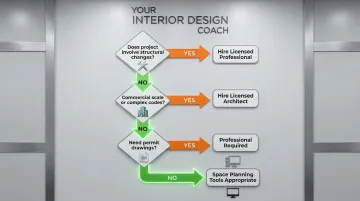
- Structural changes require professional engineering input, not just visualization
- Commercial-scale projects demand licensed architects familiar with complex building codes
- Permitting drawings must meet regulatory standards that consumer software doesn't address
The right time to use these tools: When you need to express your vision, compare layout alternatives, or communicate ideas to contractors, family members, or design professionals before making physical or financial commitments.
What You Need Before Using Space Planning Tools
Accurate Room Measurements
Start with precise measurements. Document:
- Length and width of walls
- Ceiling height
- Door locations and swing direction
- Window placement and sill height
- Electrical outlets, switches, and data ports
- Fixed features like closets, fireplaces, or built-ins
Even sophisticated software produces unusable results with incorrect dimensions - garbage in, garbage out. Accurate measurements prevent costly furniture purchases that don't fit and layouts that look right on screen but fail in practice. I usually recommend spending an extra five minutes measuring twice: it eliminates the most common reason people start over.
Clear Functional Goals
Before arranging furniture, define how the space will be used:
- Primary activities: Will you use the space for sleeping, working, entertaining, or hosting guests?
- Users: How many people will use the space? What are their ages and accessibility needs?
- Daily patterns: What are your morning routines, evening activities, and traffic flow requirements?
These functional priorities determine furniture types, placement logic, and clearance requirements.
Visual References
Photos help you match colors, textures, and proportions accurately. Collect:
- The existing space from multiple angles
- Furniture you plan to keep (with measurements)
- Inspiration images showing desired style or layout concepts
This visual library ensures existing pieces integrate properly into your digital plan.
When to Consider Professional Design Coaching
Professional guidance helps when you feel stuck between options, can't visualize the final result, or need validation before expensive purchases.
At YIDC, I help you sort through the part that still feels unclear, whether that is the layout, furniture size, traffic flow, or how to explain your vision before moving forward.
How to Use Space Planning Tools (Step-by-Step)
Before I trust any on-screen layout, I want to know that the measurements, furniture sizes, door swings, and walkways are correct. If one of those is off, the plan can look good but still fail in the room.
Drawing Your Space Layout
Create the room shell first:
- Draw walls to exact dimensions using the tool's measurement display
- Verify each wall length matches your physical measurements
- Add doors in their precise locations, noting swing direction (critical for furniture placement)
- Insert windows with accurate sill heights
- Mark built-in features like closets, fireplaces, or structural columns
Mark infrastructure:
Mark electrical outlets, light switches, and data ports on your plan. These constrain where you can place desks, lamps, entertainment centers, and charging stations. Ignoring infrastructure creates beautiful layouts that lack practical power access.
Adding Furniture and Fixtures
Select functional pieces first:
- Browse the tool's object library for beds, sofas, desks, tables, and storage
- Prioritize function over aesthetics at this stage
- Choose items that match your documented activities and user needs
Resize for accuracy:
Generic furniture dimensions in software libraries rarely reflect real products. Measure your existing pieces or look up manufacturer specifications for items you plan to purchase, then resize each digital object accordingly - a 90-inch sectional consumes significantly more visual and physical space than a 72-inch sofa, and the difference only becomes obvious when you've already bought it.
Maintain proper clearances:
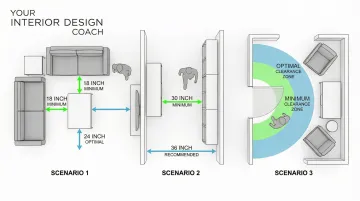
- Walkways: Minimum 30-36 inches for comfortable passage
- Door swings: Ensure doors open fully without hitting furniture
- Drawer and cabinet access: Leave space for full extension
- Seating areas: 18-24 inches between coffee table and sofa
The National Kitchen & Bath Association recommends at least 36 inches for residential walkways, while work aisles in kitchens should be 42 inches for single cooks and 48 inches for multiple users.
Visualizing and Refining in 3D
Switch to 3D perspective:
2D plans show spatial relationships, but 3D views reveal how the space feels. Check sightlines from the entry, assess visual balance, and determine whether the layout feels cramped or spacious.
Use virtual walkthroughs:
If your tool offers walkthrough features, experience the flow from entry to functional areas. Does the path feel natural? Can you move comfortably between activity zones? VR-based interactive design helps users perceive spatial environments more accurately, leading to better-informed decisions.
Apply materials and colors:
Add realistic finishes to walls, floors, and furniture. This preview helps you evaluate the overall aesthetic and identify potential clashes before purchasing. Color and texture dramatically affect how spacious or intimate a room feels.
Testing Multiple Layout Options
Create variations systematically:
- Save your initial layout as "Version 1"
- Duplicate it and test a different furniture arrangement
- Try alternative focal points (TV vs. fireplace, bed against different walls)
- Experiment with space division in open-plan areas
Gather feedback:
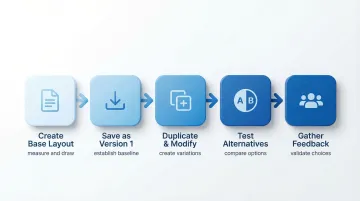
Share options with family members, roommates, or potential guests. Others often notice practical issues or preferences you overlooked.
If you have two layouts and cannot tell which one will work better, I can help you compare the trade-offs: traffic flow, furniture scale, storage, and how the room will actually be used. Reach out for a free consultation at 408-306-5003, and we can take it from there.
Preparing Your Final Plan for Action
Print to scale:
A scaled floor plan lets you physically measure and mark furniture placement in your actual space before moving heavy items.
Use painter's tape on the floor to outline furniture footprints and verify the layout works in reality.
Create a shopping list:
Document exact dimensions, quantities, and specifications for furniture or fixtures you need to purchase. Include product links or model numbers to ensure you buy the correct sizes.
Export professional documentation:
If working with contractors or installers, export high-quality floor plans and 3D renderings. Clear visual communication reduces costly misunderstandings during implementation.
Where Space Planning Tools Are Commonly Used in Practice
Residential Redesign and Renovation
Homeowners rely on digital planning to reimagine living rooms, bedrooms, home offices, and kitchens before hiring contractors or making purchases.
Median renovation spending increased 60% between 2020 and 2023, reaching $24,000. This growing investment reflects the need for confident planning before committing to major changes.
Airbnb and Vacation Rental Optimization
Hosts use space planning tools to improve guest comfort, functionality, and photographic appeal, all directly affecting booking rates. Professional photography increases bookings by up to 40%, making layout planning a direct revenue strategy.
Key areas to focus on include:
- Furniture arrangement for maximum perceived space
- Traffic flow that feels intuitive to guests
- Strategic focal points for listing photography
- Multifunctional layouts for varied guest needs
Real Estate Staging and Presentation
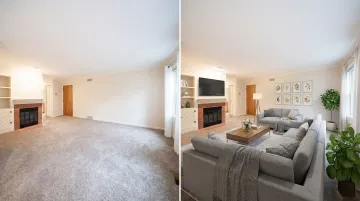
Agents and contractors use these tools to show sellers how to stage properties or help buyers visualize renovation potential. The NAR reports that 83% of buyers' agents say staging makes it easier for buyers to visualize properties as their future home.
Know when the tool is not enough: If your plan involves structural changes, expensive purchases, contractor work, or anything you are still unsure about, it is worth getting a second opinion before you commit.
Best Practices for Using Space Planning Tools Effectively
Measure twice, input once: Double-check all dimensions before starting your digital plan. Correcting measurements later requires redoing significant work and undermines confidence in your design.
Design for real-life movement: Don't just fit furniture into a room. Simulate how people will actually move through and use the space. Walk the path from the entry to the seating areas mentally.
Does the layout support natural traffic flow and intended activities?
Account for visual weight and balance: Large, dark furniture pieces feel heavier than light-colored ones. Distribute visual weight evenly to avoid one side feeling cramped while the other feels empty.
The American Society of Interior Designers identifies symmetrical, asymmetrical, and radial balance as key principles for cohesive spaces.
Save multiple versions and experiment freely: Digital tools make testing ideas consequence-free. Create several layout options and live with them virtually for a few days before deciding. You'll notice practical issues that weren't immediately obvious.
Your Quick Recap
The biggest mistake people make with space planning tools is starting before they measure. The software is only as accurate as the numbers you put in. Once your dimensions are right, these tools do something very powerful - they make disagreements visual, so everyone can see the problem instead of arguing about it.
- Wrong measurements lead to furniture that does not fit; measure twice before you open any software
- The 3D view is not a luxury feature - it reveals problems the 2D plan hides
- Saving multiple layout versions is free; committing to the wrong layout is not
- Tools help you communicate your vision to contractors - this alone saves money
- The moment you feel stuck choosing between two options, that is the right time to get a second opinion (bonus insight)
If you’ve used a planning tool but still feel unsure about the layout, I can help you check the furniture scale, traffic flow, spacing, and the details that are hard to judge on screen. Reach out for a free consultation at 408-306-5003, and we can take it from there.
Frequently Asked Questions
How to conduct a space utilization study?
Track how you use each room for 1-2 weeks, noting pain points and underutilized areas. Then use a space planning tool to test layouts that support your actual activities and create adjacency maps showing which functions need proximity.
What is the best software for space planning?
RoomSketcher, Planner 5D, and SketchUp Free offer the best balance of features and ease of use for residential and small-scale projects. RoomSketcher delivers professional-quality floor plans, while Planner 5D excels in quick visualization.
What are the 6 major planning tools and techniques?
The six core techniques are: accurate measurement, functional zoning, traffic flow analysis, furniture scaling, 3D visualization, and iterative testing. These tools work together to create functional layouts that support how you actually live in your space.